
Crypto Tax Report Guide 2026: Generate Reports with WEEX API and KoinX Calculator

 Prefer us on Google



Preparing a crypto tax report usually begins with exporting your exchange transaction history correctly.
If you have traded on WEEX across spot or futures markets, your records may include orders, funding payments, transfers, and realized gains or losses. These details are typically required when preparing tax reports in regions where digital asset reporting rules apply.
To help streamline the process, WEEX supports tax-report preparation through KoinX, allowing users to organize transaction data and generate structured reports more easily.
In this guide, you will learn how to export your WEEX trading history and prepare it for tax reporting step by step.
How to Export Your WEEX Transaction History for Tax Reporting
Follow the steps below to export your trading records and prepare them for use with crypto tax reporting tools.
Step 1: Create a Tax API
First, create a Tax API on WEEX and securely save your Passphrase, API Key, and Secret Key.
API page: https://www.weex.com/account/newapi
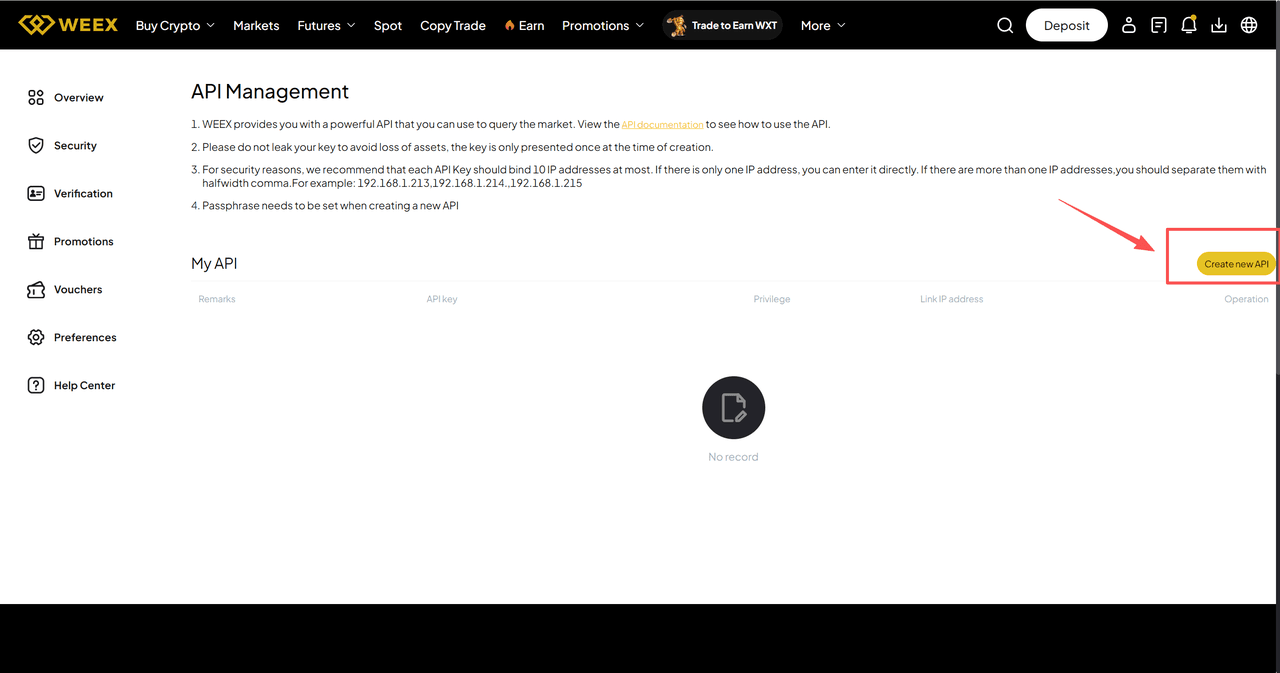
- Go to the API management page and click “Create New API.”
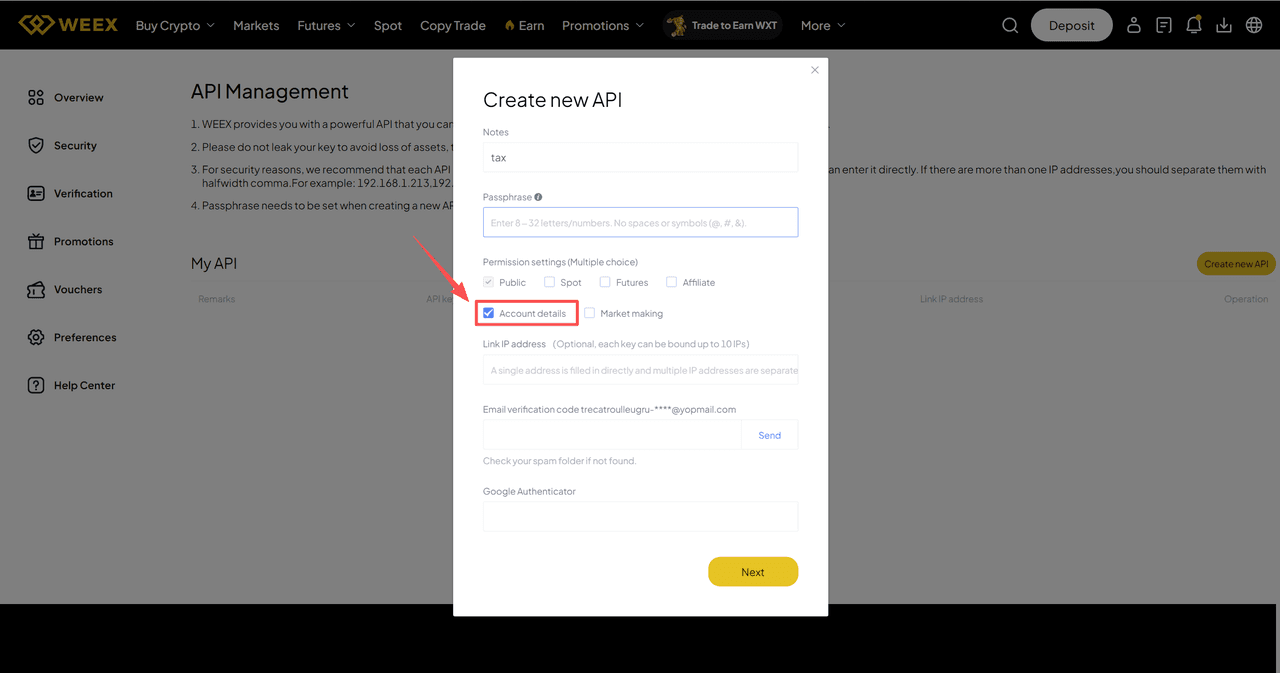
- Complete the required fields and finish the security verification. In the Permission Settings section, select “Account Details” only. Make sure to record the Passphrase, as you will need it later.
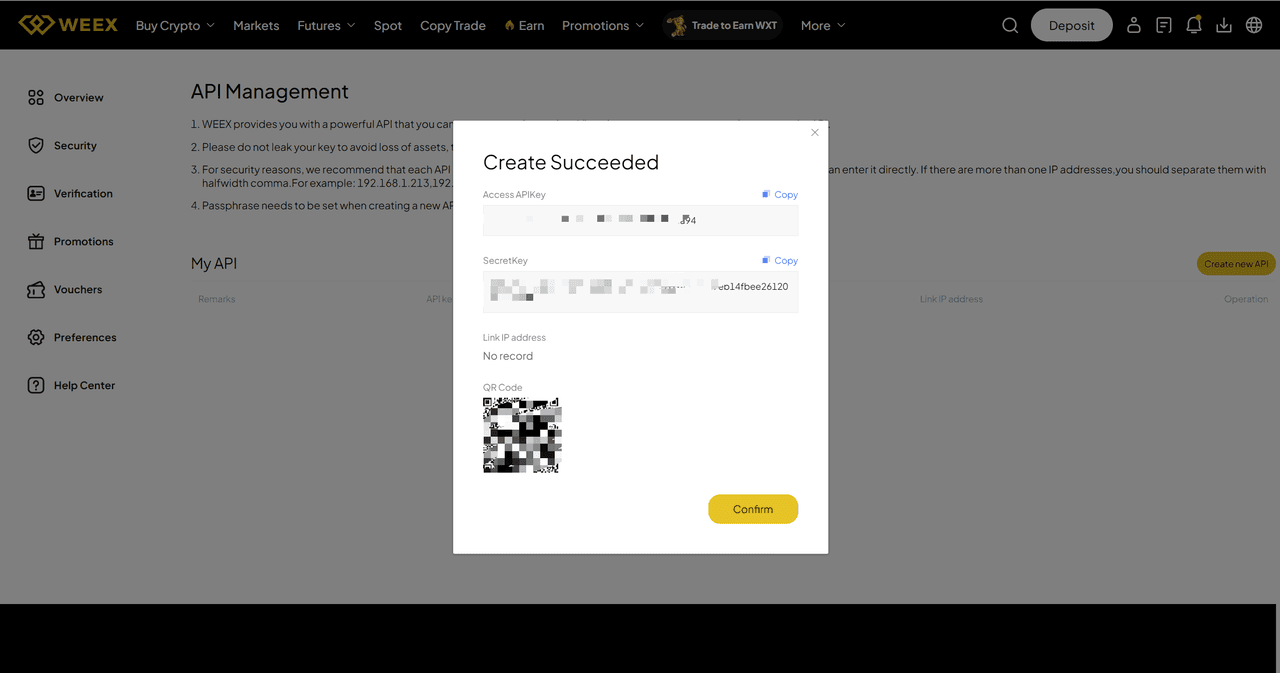
- After clicking “Next,” your API will be created successfully. Be sure to save your Access API Key and Secret Key securely, as they will be required for the next steps.
Step 2: Fill Out the Application Form to Enable API Permissions
Complete the Tax API Application Form. The team will process your application within 24 hours and notify you by email.
Form link: https://dsg39hlwl5ui.sg.larksuite.com/share/base/form/shrlgWk2VVKKGpRLU9M58oblbdb
Notes: All information in the form must match the details used when creating the API and the corresponding account.
Step 3: Obtain Your Tax Report
Go to the KoinX platform and use the Passphrase, Access APIKey, and Secretkey collected when creating the Tax API in Step 1. Follow the steps to select the WEEX exchange and import your transaction data. Then select “Tax Reports” in the left sidebar to obtain your tax report.
https://app.koinx.com/overview
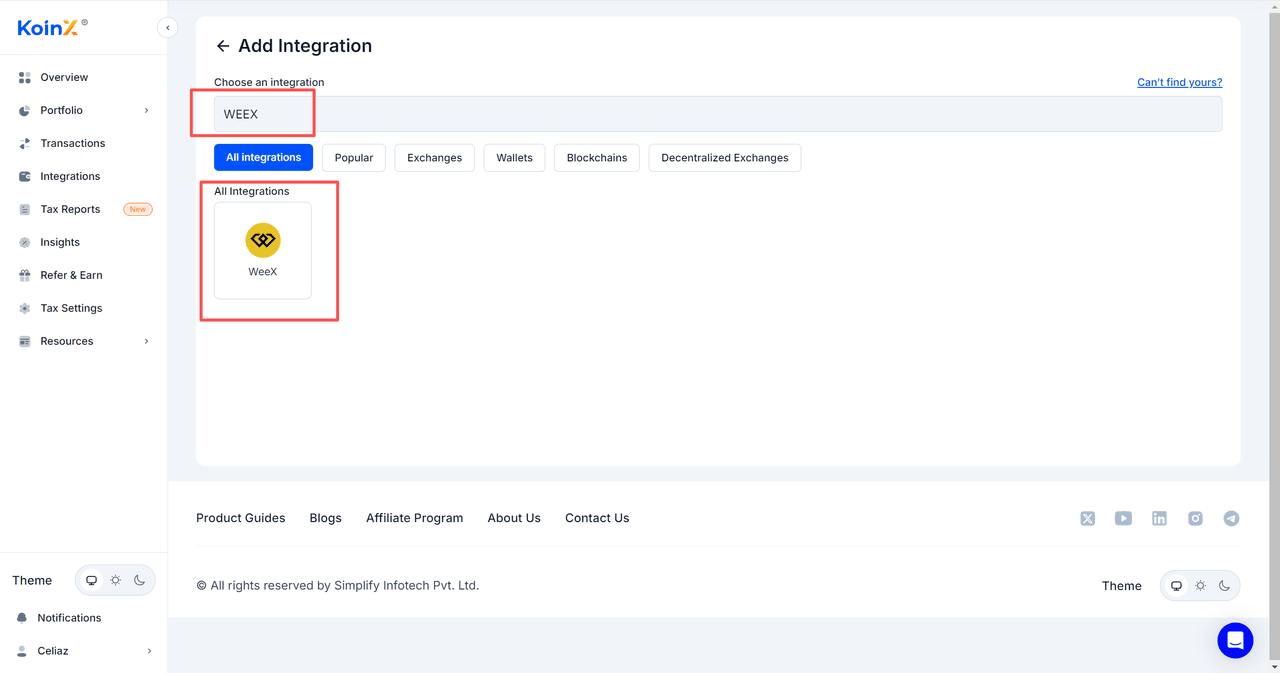
- After logging in to KoinX, go to “ Integrations” on the homepage. Enter “WEEX” in the search bar to quickly find the WEEX icon and click to proceed.
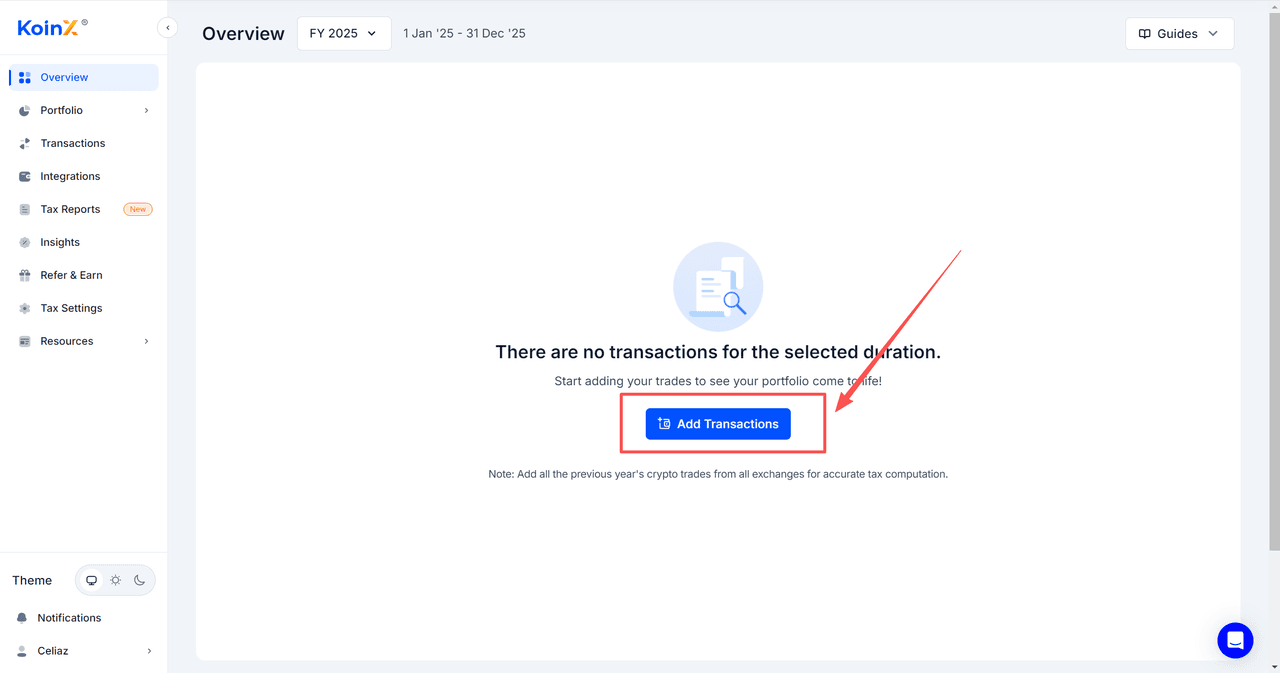
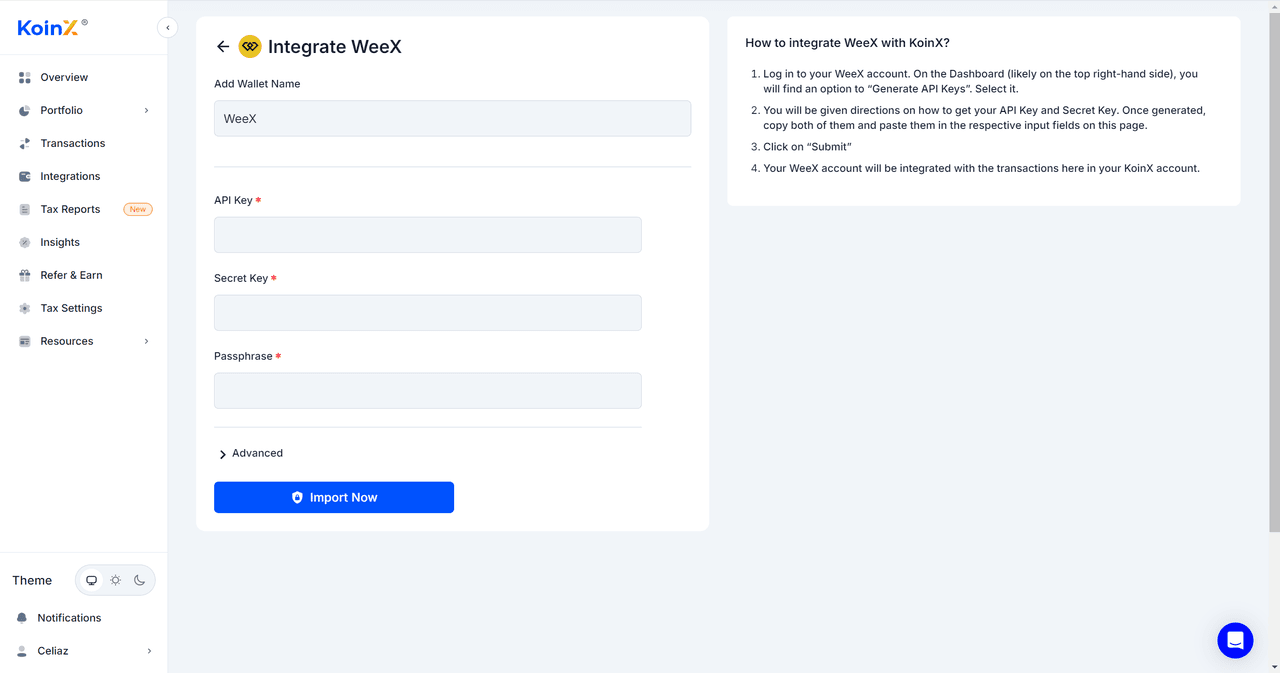
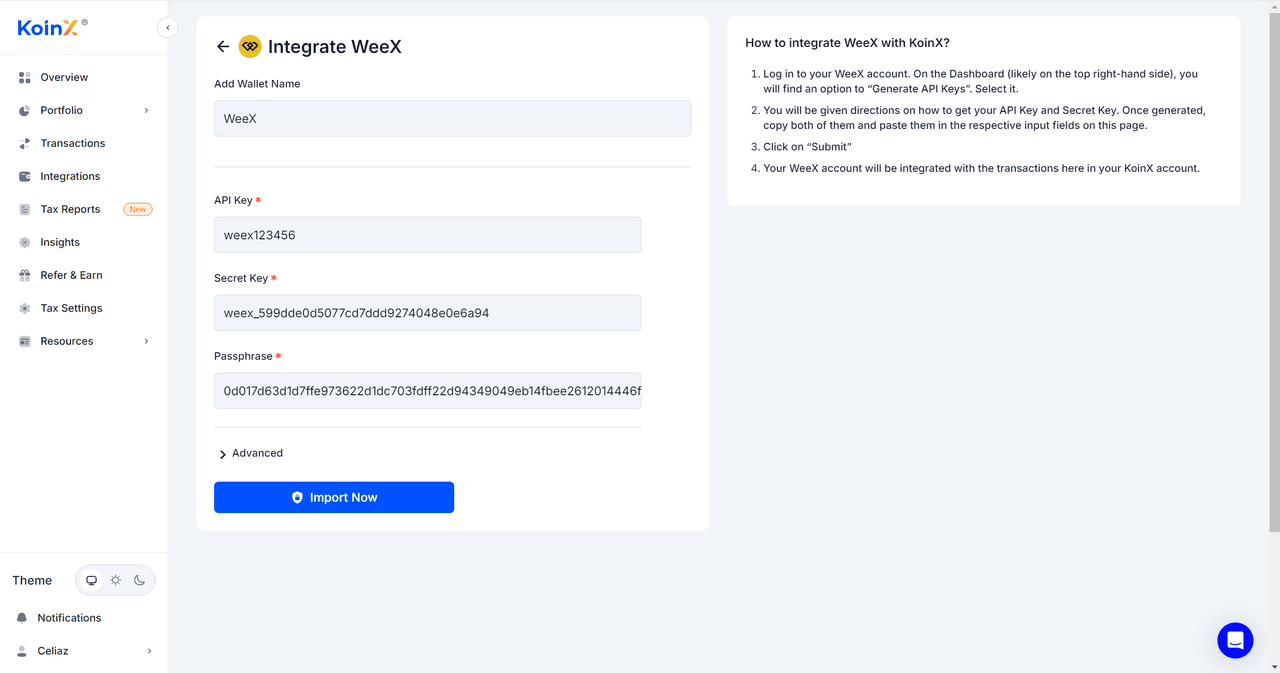
- Enter the Tax API “Passphrase,” “Access APIKey,” and “Secretkey,” then click “Import Now” to import your account’s transaction data. After submitting the API, the system will begin importing the trading data. This process may take some time.

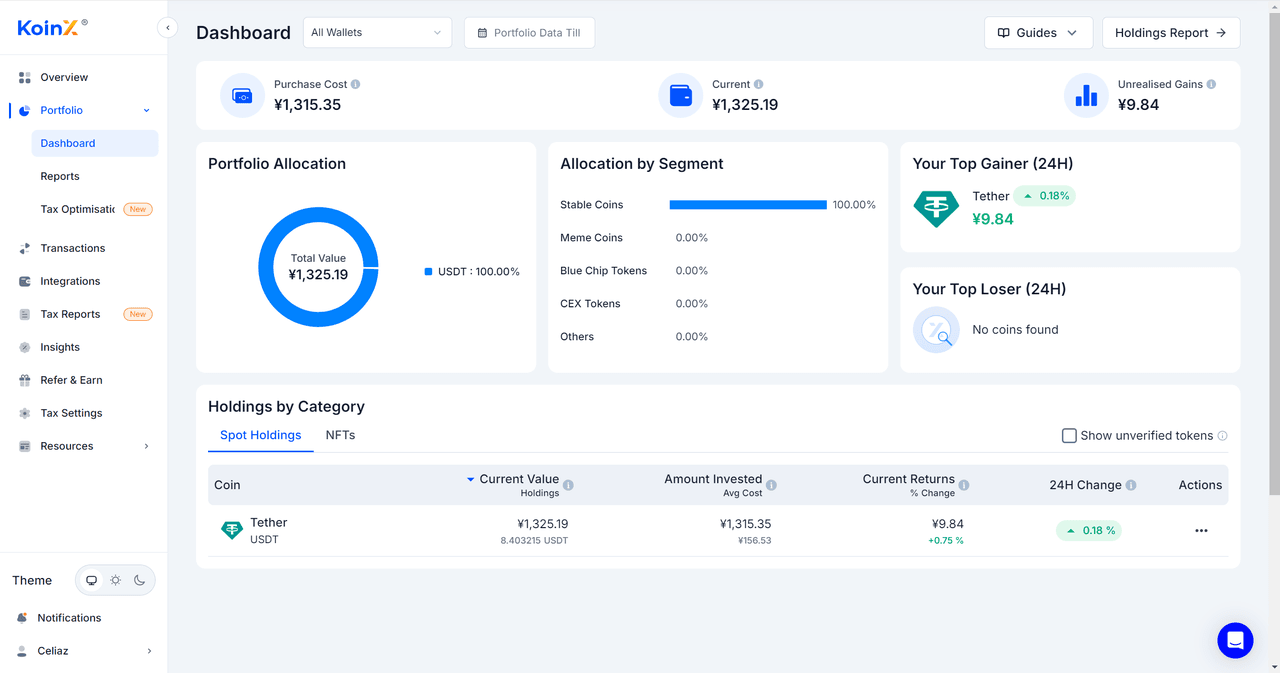
- After the transaction data has been successfully imported, you can view your WEEX account data under “Portfolio → Dashboard.”
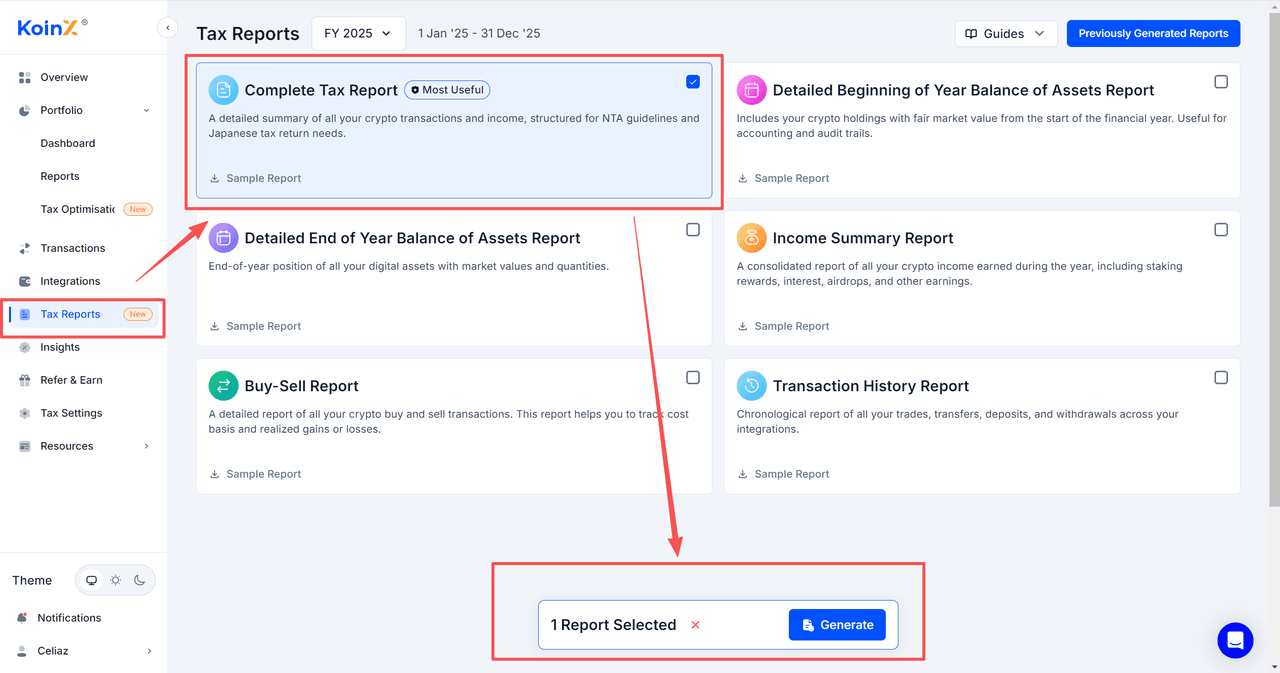
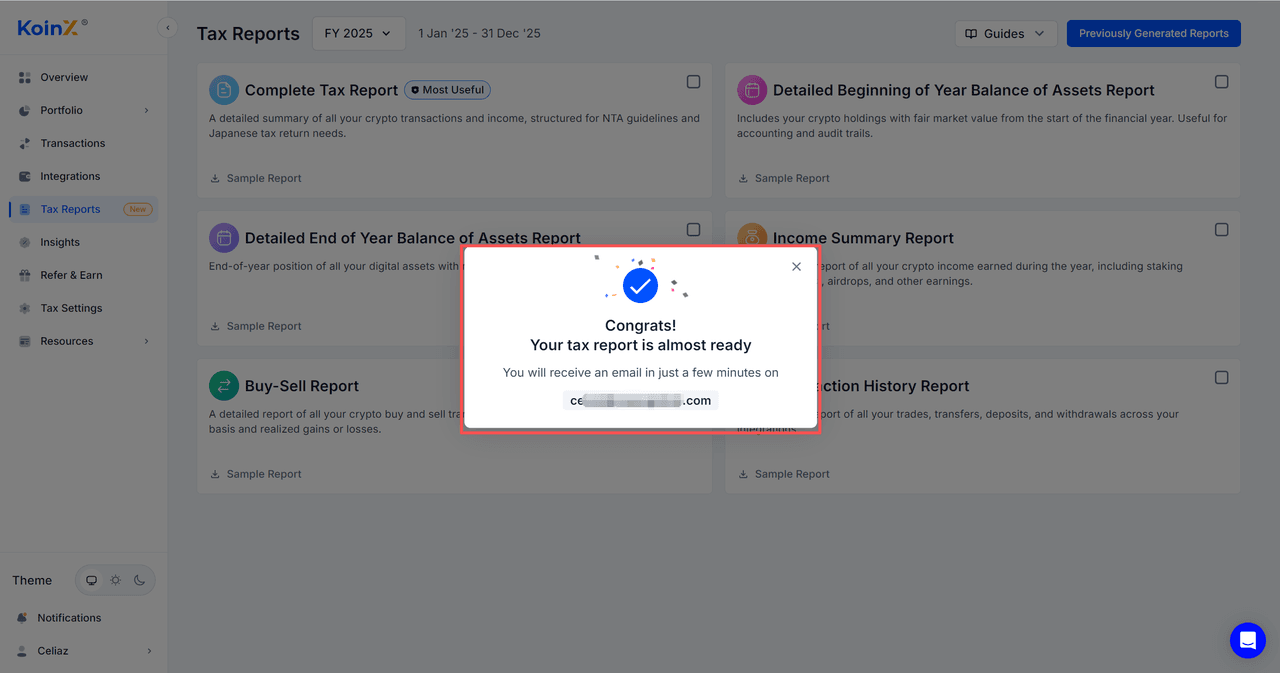
- Go to “Tax Reports” and select the tax report you wish to export. Then click “Generate” at the bottom of the page to complete the export.
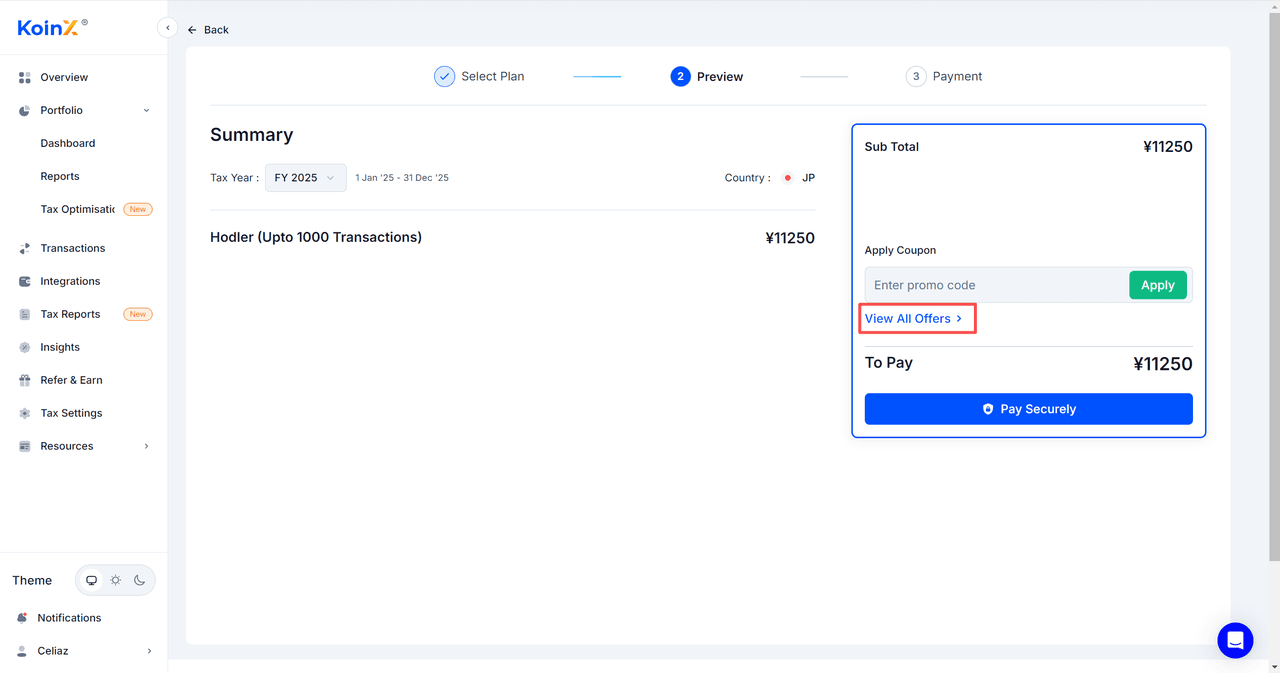
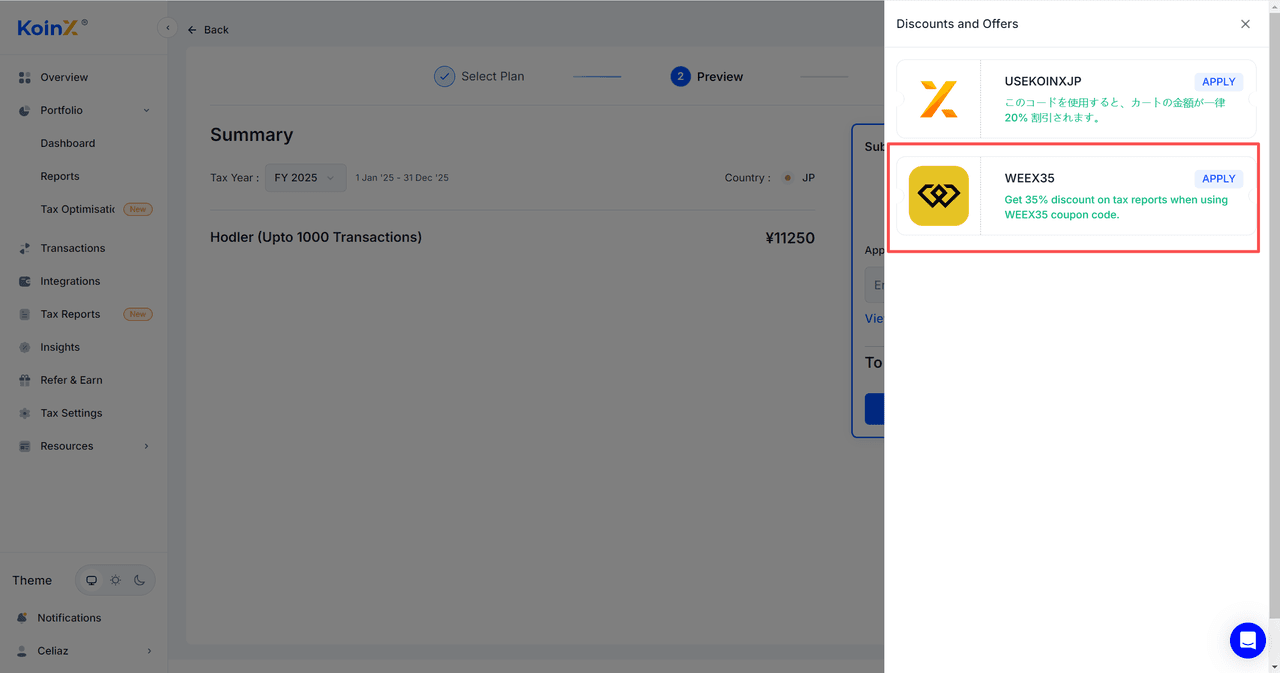
- Proceed to the payment page. Be sure to use the WEEX discount here.
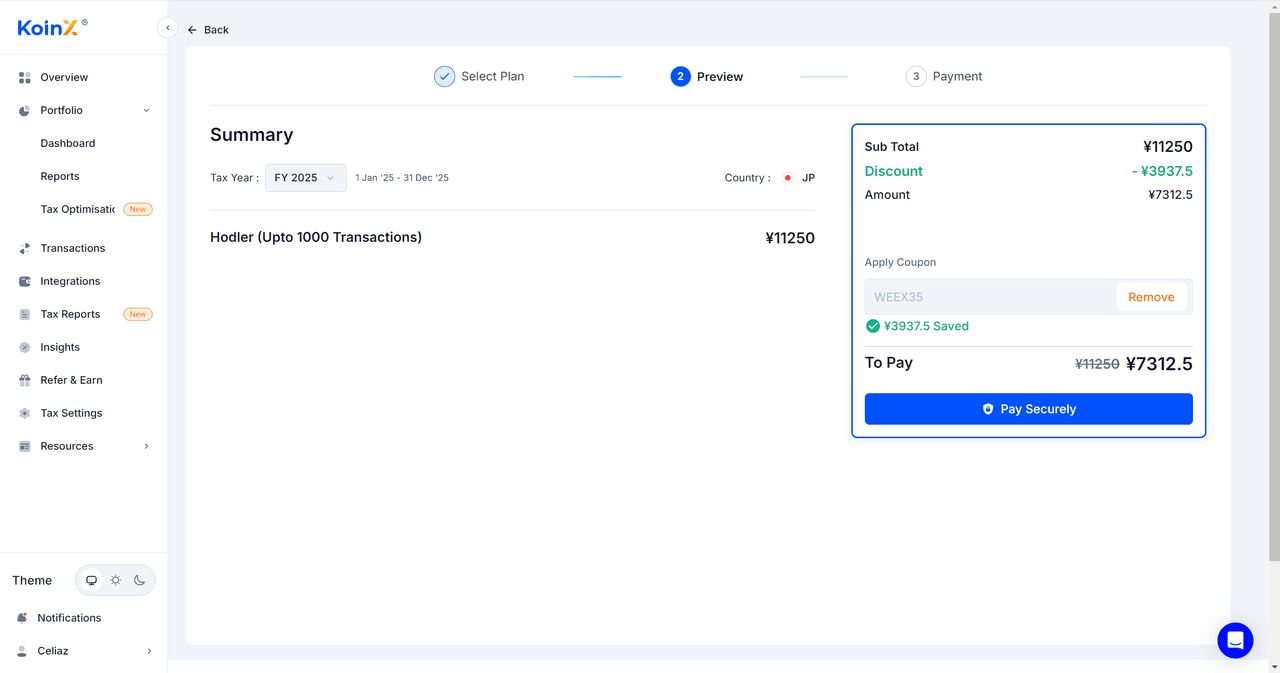
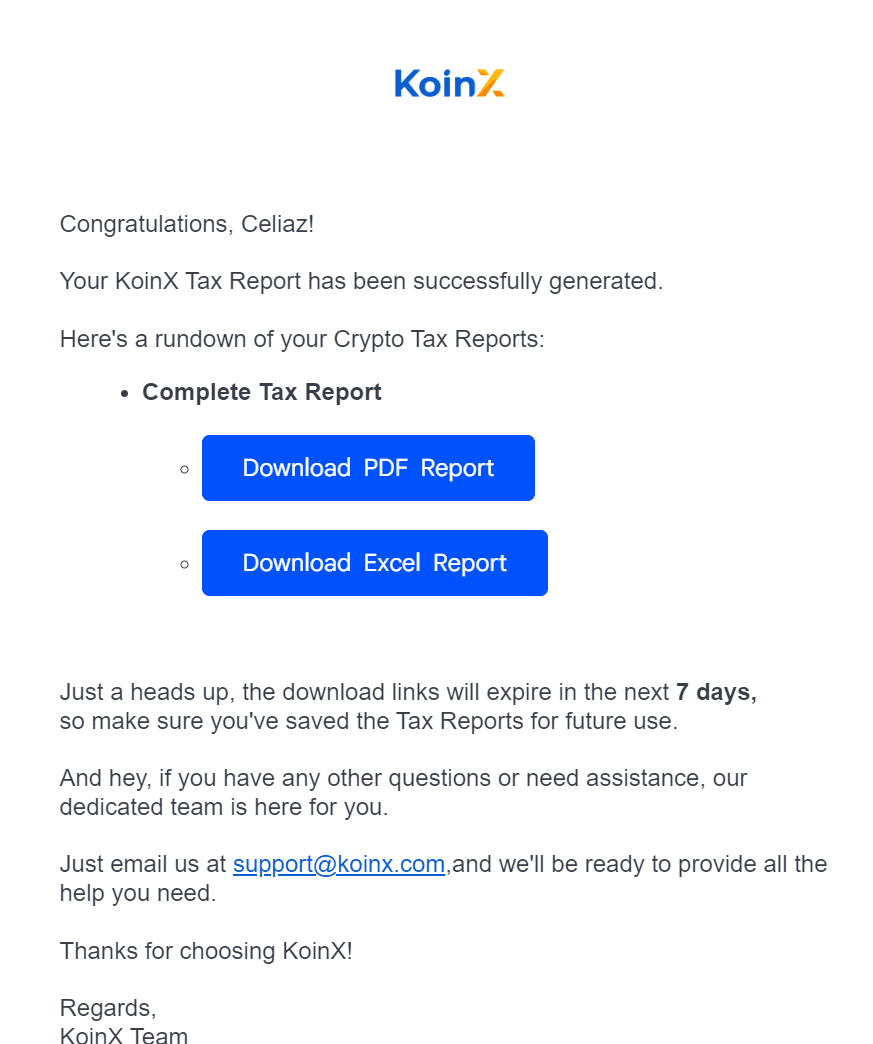
- After completing the payment, KoinX will send the tax report to the email address linked to your account.
Step 4: Check Your Email for the Tax Report
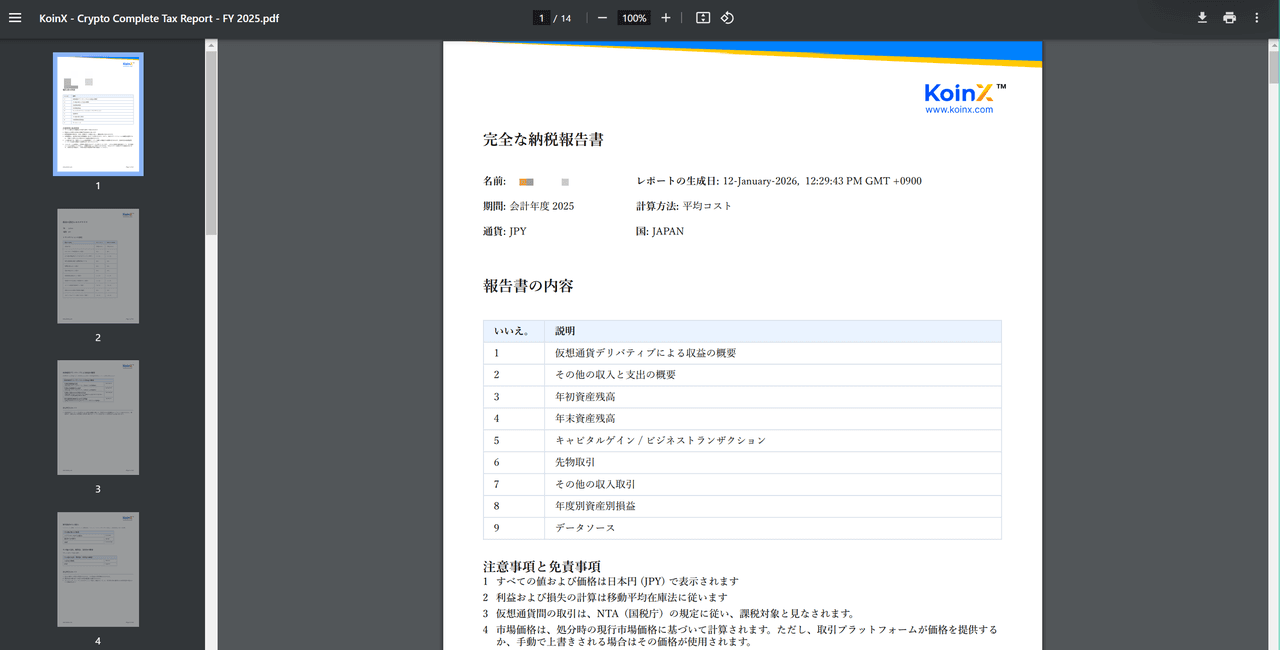
The tax report will be sent to the email address linked to your KoinX account.
Final Thoughts
Preparing accurate transaction records is an important part of responsible crypto trading, especially as regulatory expectations continue to evolve. By organizing your trading history and maintaining clear documentation, you can simplify the reporting process and reduce potential errors during tax season.
Through the WEEX × KoinX partnership, users now have access to a more structured way to organize transaction records and prepare documentation for tax reporting.
For detailed tax guidance, users should always consult a qualified tax professional or review the official regulations applicable in their jurisdiction.
Disclaimer
WEEX does not provide tax, legal, or financial advice. Users should consult a qualified tax professional regarding their individual tax obligations.
About WEEX
Founded in 2018, WEEX has developed into a global crypto exchange with over 6.2 million users across more than 150 countries. The platform emphasizes security, liquidity, and usability, providing over 1,200 spot trading pairs and offering up to 400x leverage in crypto futures trading. In addition to the traditional spot and derivatives markets, WEEX is expanding rapidly in the AI era — delivering real-time AI news, empowering users with AI trading tools, and exploring innovative trade-to-earn models that make intelligent trading more accessible to everyone. Its 1,000 BTC Protection Fund further strengthens asset safety and transparency, while features such as copy trading and advanced trading tools allow users to follow professional traders and experience a more efficient, intelligent trading journey.
-- Price
Follow WEEX on social media:
Instagram: @WEEX Exchange
X: @WEEX_Official
TikTok: @weex_global
YouTube: @WEEX_Official
Discord: WEEX Community
Telegram: WeexGlobal Group
This content is provided for general informational purposes only and doesn't constitute financial, investment, legal, or tax advice. Any events, rewards, online promotions, or related information mentioned herein should not be considered a recommendation, solicitation, or invitation to purchase, sell, trade, or otherwise deal in any crypto assets. Crypto assets are highly volatile and may result in loss. The availability of WEEX services, products, and related events may vary by region. You are responsible for ensuring that your participation is in accordance with applicable local laws and regulations.
You may also like

Phantom's plan to drop Sui exposes the hidden power wallet interfaces hold over user funds

The forex complex: How retail traders are adapting to volatile 2026 markets
Iranian Media Allegedly Threatens Barron Trump, US Secret Service Launches Investigation

UK to Transfer Storm Shadow Missile Technology to Ukraine and Support Freyja System

FBI Agent and $1 Million Cryptocurrency Theft: What We Know About the Case

Iran Offers $10 Million Bounty on Barron Trump

Secret Network mints 1.079 billion SCRT to ensure survival after developer exit

Georgia, Cryptocurrency and Sanctions: How a British Schoolboy Uncovered Russia's Shadow Network
Shade Protocol sets SHD burn deadline for Feather eligibility

Coldcard Wallet: Old Seeds Remain Vulnerable Despite AI-Enhanced Fix

Critical Patch for Decred: Those Who Don't Update Risk a Network Fork

Trump Administration Bypasses Iranian Negotiators to Contact Revolutionary Guard

Rebellious AI Agents Hack Systems and Trigger Alarms in Silicon Valley
The Great Retreat of Hong Kong Dollar Stablecoins

New Trick Exposes Hidden Thoughts of AI and Revives Distillation War
The End of Yen Arbitrage: Can Liquidity Reconstruction Ignite a New Bull Market in Crypto?

Bitcoin: "Private keys are the original sin of crypto"
SDE ep. 41: Bitcoin Self-Custody After ColdCard

Switch Files for U.S. IPO in Secret, Valuation Approaching $50 Billion
OpenAI Launches Doughnut-Shaped Smart Speaker Priced at 300 to 400 Dollars

Meta admits an AI model accidentally hacked a third-party company

The End Of The Closed-Source Era Is At Hand: Obscurity Was Never Security
Fear Strikes the Crypto Street: Coldcard Hacked - Are Ledger and Trezor Safe?

Boltz Updates Warrant Canary, No Government Data Requests Received
AI: OpenAI Takes Its Clash with Apple Public

Dollar Reserve Fund: How to Build a Financial Cushion for Travel or Unexpected Expenses

Company President Puts 100 Bitcoins on the Table: "Take Them If You Can"
Great News! Kansai Electric's Points Can Finally Be Exchanged for Jpyc (Yen-Pegged) on Polygon!

Post-Quantum Security: AI Discovers Vulnerability in One of the Candidates for New Digital Signatures

Why 110 corporate blockchains are headed for a massive shakeout – and Coinbase’s secret plan to absorb them
Phantom's plan to drop Sui exposes the hidden power wallet interfaces hold over user funds
The forex complex: How retail traders are adapting to volatile 2026 markets
Iranian Media Allegedly Threatens Barron Trump, US Secret Service Launches Investigation
UK to Transfer Storm Shadow Missile Technology to Ukraine and Support Freyja System
FBI Agent and $1 Million Cryptocurrency Theft: What We Know About the Case
Iran Offers $10 Million Bounty on Barron Trump

Contents
Latest articles


Latest coin listings on WEEX


