
Crypto Exchange API: Permissions, Signing and Rate Limits

 Prefer us on Google


The first thing you hand over to a crypto exchange API is not code. It is a key. Every guide tells you to keep it safe; almost none of them show you what the key can actually do on a specific exchange, which is where the real risk lives. This walkthrough uses WEEX's published API documentation as the working sample and answers four questions in order: what the API is, what it can do, how a signed call is built, and what happens if the key leaks.
Every parameter, rate limit and error code below comes from WEEX's official API documentation (spot and futures FAQs last updated 2026-04-14), checked in August 2026. Docs change between versions — verify against the live pages before you ship.
What a Crypto Exchange API Actually Does
A crypto exchange API exposes two families of endpoints, and the split is whether the request carries your identity.
- Public endpoints return market and configuration data: candlesticks, order book depth, recent trades, the tradable symbol list. No authentication, open to anyone, rate limited by IP.
- Private endpoints touch your account: balances, positions, order placement, cancellation. Every request must carry a signature the server verifies before it executes anything.
That split should drive your architecture. Market data can run anywhere — a leaked public endpoint costs you nothing. Private calls belong on a host whose outbound IP you control. Plenty of teams run both in one process because it is convenient, and then a dependency vulnerability on the market-data side hands over the trading key.
WEEX serves spot REST from https://api-spot.weex.com, with spot paths under /api/v3/ and futures under /capi/v3/. The prefixes are not interchangeable, and mixing them is the most common cause of an unexplained 404.
API Key Permissions: The One Most Guides Get Wrong
Nearly every "API key security" article on the first page of Google assumes three permission tiers — read, trade, withdraw — and tells you to leave withdrawal off. That advice is fine, but it hides a more useful question: does the exchange offer a withdrawal permission at all?
On WEEX, it does not. The permissions available when you create a key are these, and they are independent of each other:
| Permission | What it allows | What it blocks | Typical use |
|---|---|---|---|
| Readonly (default) | Query balances, positions, trade history, ledger | Any order placement or cancellation | Asset monitoring, ledger sync, market analysis |
| Spot | Place/cancel spot orders, query spot assets | Futures open/close | Spot bots, automated rebalancing |
| Futures | Open/close positions, set TP/SL, query positions | Spot trading | Futures hedging, high-frequency strategies |
| — | — | Withdrawals, transfers to external addresses | Not exposed through the API |
This matters more than any encryption detail. When you read about "an API key leak that drained an account," the funds were usually not withdrawn — the attacker used trading permission to run a pump-and-dump on an illiquid pair, buying into the victim's account at inflated prices and selling their own bags into it. No withdrawal permission does not mean the assets are safe. It means the attack shifts from theft to induced loss.
Keys default to Readonly. You have to tick a trading permission deliberately, which is the right default and also why a first order so often returns -1052 (Insufficient permissions). Each account can hold up to 10 key groups; split them by purpose rather than sharing one. A read-only key for monitoring and a separate trading key for the strategy means that when something goes wrong you can identify and revoke exactly one.
Creating a key hands you three credentials with three different jobs:
| Credential | Role | If lost |
|---|---|---|
| APIKey | Identity, sent in the request header | Retrievable from the dashboard |
| SecretKey | Signing key, used locally, never transmitted | Leak equals handing over trading rights |
| Passphrase | User-set, alphanumeric only, no special characters | Unrecoverable — you must rebuild the whole key group |
The passphrase cannot be changed or recovered. Store it in a secrets manager alongside the SecretKey, not in a config file in your repo. Field-level detail is in the WEEX API integration preparation docs.
How to Sign a Request: Building the ACCESS-SIGN Header
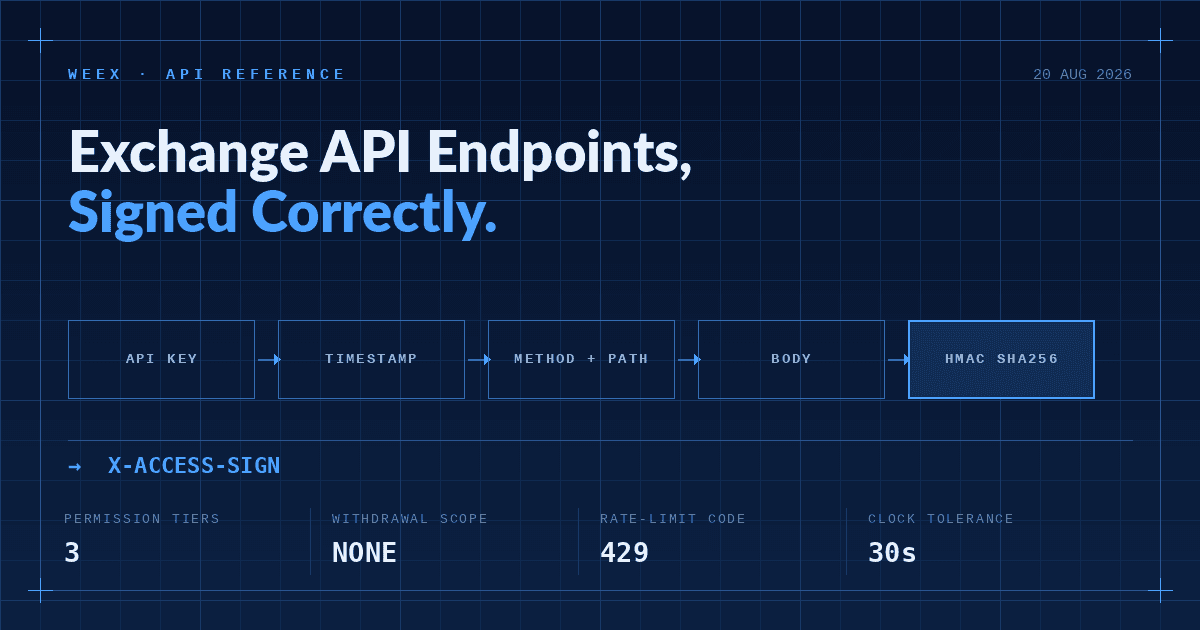
Private endpoints hinge on the ACCESS-SIGN header. The rule is short; the failure mode is that one wrong character in the concatenation breaks everything with an error that points somewhere else.
WEEX concatenates in this order, runs HMAC SHA256 with your SecretKey, then Base64-encodes the result:
timestamp + method.toUpperCase() + requestPath + "?" + queryString + body
When queryString is empty, drop the question mark: timestamp + method + requestPath + body.
Querying BTCUSDT depth:
String to sign: 1591089508404GET/api/v3/market/depth?symbol=BTCUSDT&limit=20
Signature = base64.encode(hmac_sha256(secretKey, message))
Three details cause most of the failed integrations:
- The timestamp is in milliseconds and must be within 30 seconds of server time. WEEX compares
ACCESS-TIMESTAMPagainst its own clock and rejects anything further out. Cloud instances drift; query the server time endpoint at startup and correct against it rather than trusting localDate.now(). - The method must be uppercase. Sending
getinstead ofGETbreaks the signature, but the response reads as an authentication failure — which sends people hunting for a bad key. - Symbols are case-sensitive and must be uppercase.
btcusdtis not normalised. For order endpoints, take the symbol value from the/productsresponse instead of building it by hand.
The full worked example, including body concatenation for POST orders, is in the WEEX request signing documentation. Get one GET working before you attempt a POST.
-- Price
Rate Limits: What Triggers a 429 and How to Back Off
Exceeding a limit returns HTTP 429 and carries a roughly 10s ban. WEEX does not run one global counter — limits are scoped by dimension:
| Dimension | Spot | Futures |
|---|---|---|
| Place order | 100 / min | 300 / min |
| Cancel order | 80 / 10s, or 200 / min | Per-endpoint, see docs |
| REST/WS connection | 300 / 5 min / per IP | 500 weight / 10s / per IP |
| WebSocket | 240 channel subscriptions / hour / connection | 20 connections / per IP |
Source: WEEX spot and futures API FAQs, last updated 2026-04-14.
Two mechanics are worth internalising. Order placement is metered per account (userId) and consumes no IP weight — the IP counter in those response headers reads 0. Everything else is metered by IP weight, with heavier endpoints carrying higher weight. So several machines sharing one egress IP will compete for market-data budget but not for order budget.
Do not estimate your remaining budget with a local counter. Every response carries X-USED-WEIGHT-1M and X-REMAINING-WEIGHT-1M; order requests additionally carry X-ORDER-COUNT-* and X-ORDER-REMAINING-*. Back off on the headers rather than hardcoding "5 requests per second" — and note that WEEX's English and Chinese docs currently disagree on the spot order limit (English says 100/min, Chinese says 100/10s). The response headers are the single source of truth.
Is a Crypto Exchange API Safe? Three Links in the Chain
Safety here is a property of your configuration, not of the exchange alone. The exchange owns one link of three.
Link one: key storage. The SecretKey is shown once and never again, so leaks originate on your side — committed to Git, embedded in a frontend bundle, written to logs, pasted into a work chat. Environment variables or a secrets manager, plus one rule with no exceptions: keys never travel through messaging tools.
Link two: IP whitelisting. WEEX lets you bind IP addresses when you create a key and explicitly recommends enabling it. An unbound key works from anywhere on earth the moment it leaks; a bound one forces the attacker to compromise your server first. Do not set 0.0.0.0/0 in production — that is the same as not setting it.
Link three: least privilege. Back to the permission table: monitoring processes get Readonly, forever. A spot strategy has no reason to hold Futures. This is not fastidiousness, it is blast-radius control.
Two operational traps are documented but easy to miss:
- A new or newly modified key takes roughly 15 minutes to propagate globally. A permission error immediately after setup is usually propagation lag, not misconfiguration.
- Triggering platform risk control — suspicious logins, floods of invalid requests — can disable API permissions automatically, and reinstatement goes through support. Don't load-test with a production key.
One judgment you won't find in the generic guides: for most retail and small-fund users, the probability of key theft is well below the probability of losing money to your own error handling under rate-limit pressure. Configure security properly, then spend the same energy on retries and idempotent order placement. The expected return is higher.
Test on Paper Trading First: Five Errors That Bite New Integrations
WEEX runs paper trading endpoints on the futures side using simulated SUSDT, under /capi/v3/sim/ — sim/balance, sim/position/allPosition, sim/order, sim/order/history, with hedge-mode dual positions supported. Running a new strategy end to end there is the cheapest debugging you will ever do.
Before real capital goes in, keep this table nearby:
| Symptom | Root cause | Fix |
|---|---|---|
Order returns -1052 | Trading permission not ticked; pair not yet API-enabled; or calling deprecated V1/V2 | Enable Spot / Futures in API management, move to V3 |
Cancel returns -1054 | Order does not exist, usually a wrong order ID | Query before cancelling; don't trust a locally cached ID |
WebSocket returns 403 | Missing User-Agent header, blocked at the firewall | Add any User-Agent value to the connection header |
Request returns 404 | Wrong path prefix — spot /api/v3/ vs futures /capi/v3/ | Check requestPath against the matching doc |
HTTP 429 | Rate limit hit, ~10s ban follows | Exponential backoff driven by response headers, no blind retries |
Two more things to settle up front: WEEX does not currently support TradingView signal trading or FIX API, so strategies depending on either need another route; and V1/V2 endpoints are being deprecated, so new work should target V3 directly. The full permission and rate-limit Q&A sits in the WEEX spot API FAQ, and futures builders should start from the futures API documentation.
The Right Order to Integrate a Crypto Exchange API
Back to the four questions. A crypto exchange API is the programmatic entry point to an exchange, split into public endpoints that read and private endpoints that act. How you use it depends on which permission you tick — Readonly, Spot and Futures are independent, and WEEX does not expose withdrawals through the API at all. How you call it comes down to signing: HMAC SHA256 plus Base64, with a 30-second timestamp tolerance. Whether it is safe depends on you; the exchange supplies IP binding and permission tiers, and the rest is your operational discipline.
If you remember one thing, remember the sequence: read-only key first to prove out market data and queries, paper trading next to validate the strategy, and only then trading permissions, IP binding, and real funds. Reversing that order tends to be expensive.
Ready to build? Start at the WEEX developer centre, create a key, configure permissions, and work through the V3 endpoints one at a time.
FAQ
1. Does a crypto exchange API cost money or require an application?
On WEEX, no qualification process applies — log in to the web platform and self-serve, up to 10 API key groups per account. This differs from equity brokerage APIs, which commonly gate access behind capital, volume or professional-background requirements.
2. If my API key leaks, can someone withdraw my funds?
Not through the WEEX API — the permission set is Readonly, Spot and Futures only, with no withdrawal scope. A key with trading permission can still be abused to trade against you on illiquid pairs, moving value out as realised losses. Delete the key group immediately if you suspect exposure.
3. Do I need an API key just for market data?
No. Candles, depth, tickers and symbol lists are public endpoints, unauthenticated and rate limited by IP. Only account and order endpoints require a signature.
4. Why does a brand-new API key return an insufficient-permissions error?
New or newly modified keys take roughly 15 minutes to propagate across the system. If -1052 persists after that window, check whether Spot or Futures was actually ticked.
5. What if I forget the API passphrase?
It cannot be recovered or changed. Delete the key group, create a new one, and update every consumer of that credential.
6. Does WEEX support TradingView or FIX API?
Neither is supported as of August 2026. Teams needing institutional low-latency access should evaluate whether REST and WebSocket meet their requirements before committing.
Risk Warning
Crypto assets are highly volatile, and programmatic trading through a crypto exchange API can result in partial or total loss of capital. API-specific risks include unauthorised account activity following key exposure, cascading erroneous orders caused by strategy bugs or weak error handling, orders left unmanaged after a rate-limit ban, and amplified liquidation risk when trading leveraged futures. Implement thorough exception handling and retry logic, bind IP whitelists to every key, apply least-privilege permissions, and commit only capital you can afford to lose. The endpoint parameters and rate limits described here were verified in August 2026 and may change with platform updates — always defer to the current WEEX official API documentation. This article is not investment advice.
This content is provided for general informational purposes only and doesn't constitute financial, investment, legal, or tax advice. Any events, rewards, online promotions, or related information mentioned herein should not be considered a recommendation, solicitation, or invitation to purchase, sell, trade, or otherwise deal in any crypto assets. Crypto assets are highly volatile and may result in loss. The availability of WEEX services, products, and related events may vary by region. You are responsible for ensuring that your participation is in accordance with applicable local laws and regulations.
You may also like

How to Log In to MetaMask: Unlock, Troubleshooting and Recovery (2026)

WEEX Mini App Launch Rewards: Trial Funds, BTC Airdrops, and an iPhone 17 Pro Giveaway Explained
How to Buy USDT with JazzCash in Pakistan Safely in 2026

JazzCash Crypto Guide: How PKR-to-USDT P2P Payments Work in Pakistan

H/USDT After the Unlock: What Humanity Protocol’s New Supply Means for Traders

Why Is DGrid AI (DGAI) Trending After Its Exchange Debut?

XSolut Coin Extends Its Decline to 7 Straight Days: What Continued Selling Pressure Actually Signals
MORTY After Viral Meme Rally: Overvalued or Growth Story?

SPCX Stock Keeps Swinging Around Its $135 IPO Price : What the Lockup Schedule Still Ahead Actually Means
What Is TermMax (TMX)? Inside the New Fixed-Rate DeFi Token Launching Today
What Is XST Coin? Why There Are Multiple Tokens Using the XSolut Name on Coinbase
What Is IMX Crypto? How Immutable's Layer 2 Became the Largest Web3 Gaming Blockchain
Michael Saylor Sold 1,690 Bitcoin at a Loss: What Strategy Inc.'s August Bitcoin Sale Actually Reveals
How High Can Sandisk Stock Go? 2026 Price Target and Analyst Outlook

CLARITY Act: What Happens in the Senate's September Window
Is WEEX Safe? Verify the Reserves and 1,000 BTC Fund Yourself
How to Call a Crypto Exchange API Without Getting Blocked
What Is a Crypto Exchange API and Which Permissions to Enable
WEEX Daily Lucky Wheel and Event Airdrops: How the Rewards Actually Work
What Is ISOR Coin (Iran Strategic Oil Resource)? Facts, Risks and Where It Trades
How to Earn WXT Rewards with WEEX Trade to Earn S6 Futures Event
Roblox Stock Is Down 68% in the Past Year: What Age Verification and Sands Capital's Exit Actually Signal
Is XST Crypto a Long-Term Opportunity or Short-Term Hype?

Meta Stock Price Is Down 30% From Its 52 Week High: Is META a Buy After the Child Safety Trial Drop
How to Log In to MetaMask: Unlock, Troubleshooting and Recovery (2026)
WEEX Mini App Launch Rewards: Trial Funds, BTC Airdrops, and an iPhone 17 Pro Giveaway Explained
How to Buy USDT with JazzCash in Pakistan Safely in 2026
JazzCash Crypto Guide: How PKR-to-USDT P2P Payments Work in Pakistan
H/USDT After the Unlock: What Humanity Protocol’s New Supply Means for Traders
Why Is DGrid AI (DGAI) Trending After Its Exchange Debut?


